Documentation
Everything you need to know about the side panel interface, extraction modes, and data export formats.
01Temu Terminology
Listing / Good
A "Good" refers to the primary listing page. One listing can contain dozens of specific SKU variants.
Variants
The specific choices within a Good (Size, Color, Model). Our tool maps these for high-accuracy inventory syncing.
MSRP / Anchor Price
The original non-discounted price. The scraper extracts this to calculate the true "Discount %" and market urgency.
Sales Volume (Velocity)
The "Amount Sold" metric (e.g., 10k+ sold). This is critical for validating demand before importing a Good to your store.
Review Density
The ratio of star ratings to total sales. High density indicates an established product; low density indicates a new trending "Good."
Seller Store ID
A unique digital fingerprint for the merchant. The scraper uses this to aggregate every listing owned by a single supplier.
Lazy-Load Buffer
The technical gap where Temu waits for a user to scroll before loading more goods. Our scraper auto-scrolls to bypass this buffer.
JSON Schema Blob
The hidden data structure within a Goods HTML. Our engine parses this "blob" to find technical details not visible to the naked eye.
02Interface & Side Panel
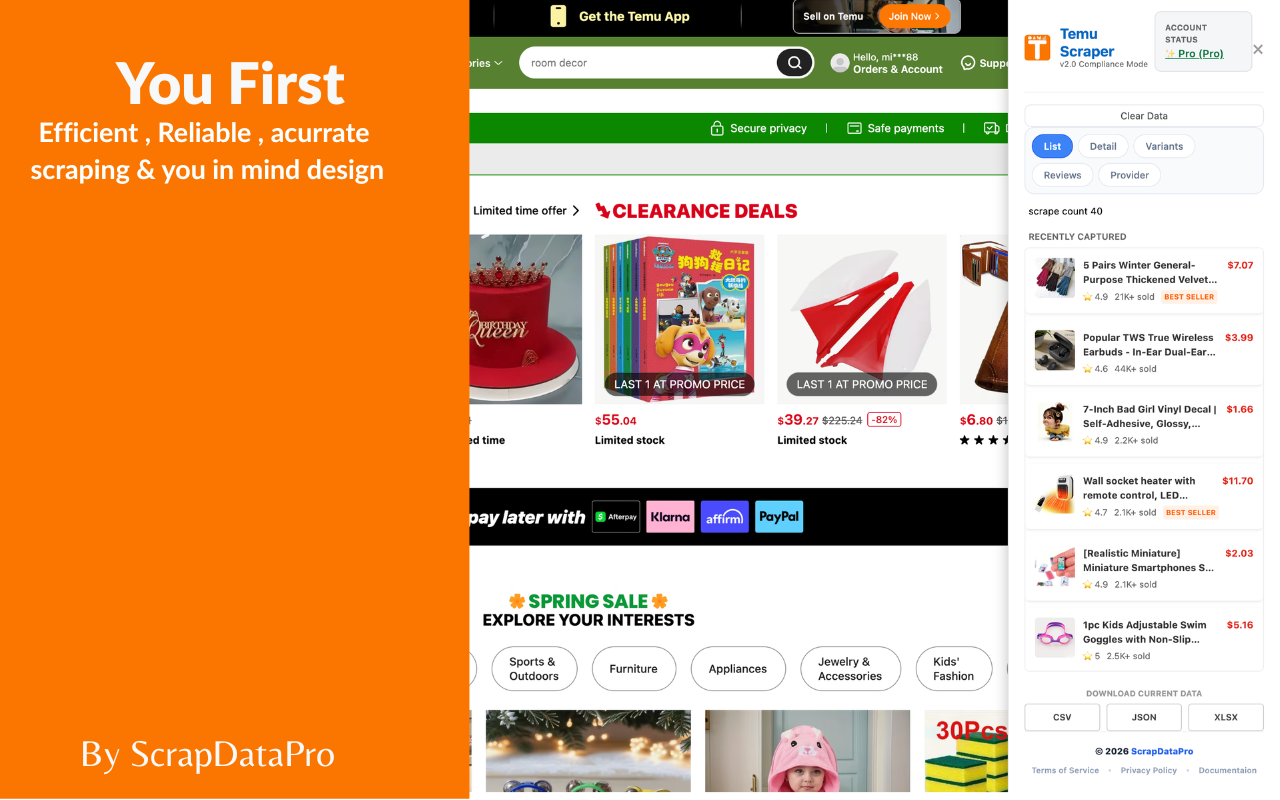
Side Panel Preview
The 6-Button Control Grid
When you click the extension icon, the side panel opens. The top grid allows you to toggle exactly what data you want to capture:
Multi-Format Exports
Below the live scraped items feed, you have 3 Export Buttons to save your data instantly:
Live Main Panel
The center of the side panel displays a live feed of every item successfully scraped. You can watch the counter increase in real-time as you navigate Temu or as the Automatic Scrolling feature loads more products.
03Safe, Fast & Reliable Extraction
100% Privacy Safe
Unlike cloud-based scrapers, our extension runs locally in your browser. This means we never see your Temu password, cookies, or search history. All data is processed on your machine and stays your business.
Local Speed Advantage
By acting as a Local Browser Agent, the tool extracts data as fast as the page loads. There are no server-side queues or proxy delays—allowing you to scrape thousands of items in seconds.
Anti-Detection Logic
Our tool mimics human browsing patterns through Adaptive Auto-Scrolling. It bypasses Temu’s bot-detection systems by interacting with the DOM exactly like a real user, ensuring your IP remains safe.
04What to do if extraction fails
Temu frequently updates its security protocols and interface. If the "Scraped Items" count is not increasing or the side panel appears frozen, follow these steps in order to restore functionality:
Reload the Page
The most common fix. Refresh the browser tab to re-initialize the DOM-injected script and clear temporary cache errors.
Session Refresh
Sign out of your Temu account and sign back in. This refreshes your session cookies, which the scraper uses to access product metadata.
Disable VPN / Proxy
Temu often blocks known VPN IP ranges. If you are experiencing "Zero Items Found," turn off your VPN or proxy to allow a direct local connection.
Restart Browser
Close all Chrome windows and restart the browser. This clears the Chrome Extension RAM buffer and stops any conflicting background scripts.
System Reboot
If the side panel fails to open entirely, restart your computer to ensure no other system processes are interfering with the extension's local environment.
Priority Support
Still having trouble? Our developers are ready to help. Please include a screenshot of your side panel in your email.
EMAIL: CONTACT@SCRAPDATAPRO.COMNote:As a Local Browser Agent, our tool relies on your current browser's ability to render Temu.com correctly. Always ensure you are using the latest version of Google Chrome for maximum reliability.
05Free vs. Pro: Understanding Limits
Free Version
Perfect for casual users and small-scale testing. Allows you to experience the full speed of the extraction engine with restricted export volume.
- Export limited to 10 rows only
- Standard Search Results Scraping
- Basic CSV Export
Pro Version
Built for professional dropshippers and market analysts who need the complete data picture without restrictions.
- Unlimited Export (Full Dataset)
- Deep SKU Variant Mapping
- Full Review & Seller Intel Extraction
- Advanced XLSX & JSON Formatting
Export Restriction Notice
If your downloaded CSV or Excel file only contains 10 rows of data despite scraping hundreds of items, you are currently on the Free Plan. To export your entire collected dataset, please upgrade to a Pro license.
06Exporting & Data Formats
How to Export
The export process is Context-Aware. Once you have completed your scraping session and the live feed is populated, look at the bottom of the right-side panel for the three export buttons.
Automatic Filtering: The tool only exports the data types currently active in your 6-button grid (e.g., if "Variants" is on, you get SKU data).
Instant Download: Files are generated locally and downloaded immediately to your browser"s default download folder.
Option A: CSV
Best for Shopify & WooCommerce
Option B: JSON
Best for Developers & AI Models
Option C: XLSX
Best for Excel & Data Analysis
Pro Tip: Always use XLSX if you intend to filter data by "Sales Volume" or "Star Rating" in Excel before importing a refined list into your store.
Guided Workflows
Detailed Good Information
Navigate to an Item Detail Page. Ensure the Details and Variants buttons are active in the side panel grid.
Seller & Store Metrics
Click on any Seller Name to visit their dedicated site. Activate the Seller button to extract their total sales and rating history.
Review Collection
On the product page, click "See All Reviews." Once the reviews load, toggle the Reviews button to begin extraction.
Ready for Unlimited Data?
Upgrade to Pro for unlimited scraping sessions and priority customer support.